

TRON BlockchainReal-time Monitoring Service
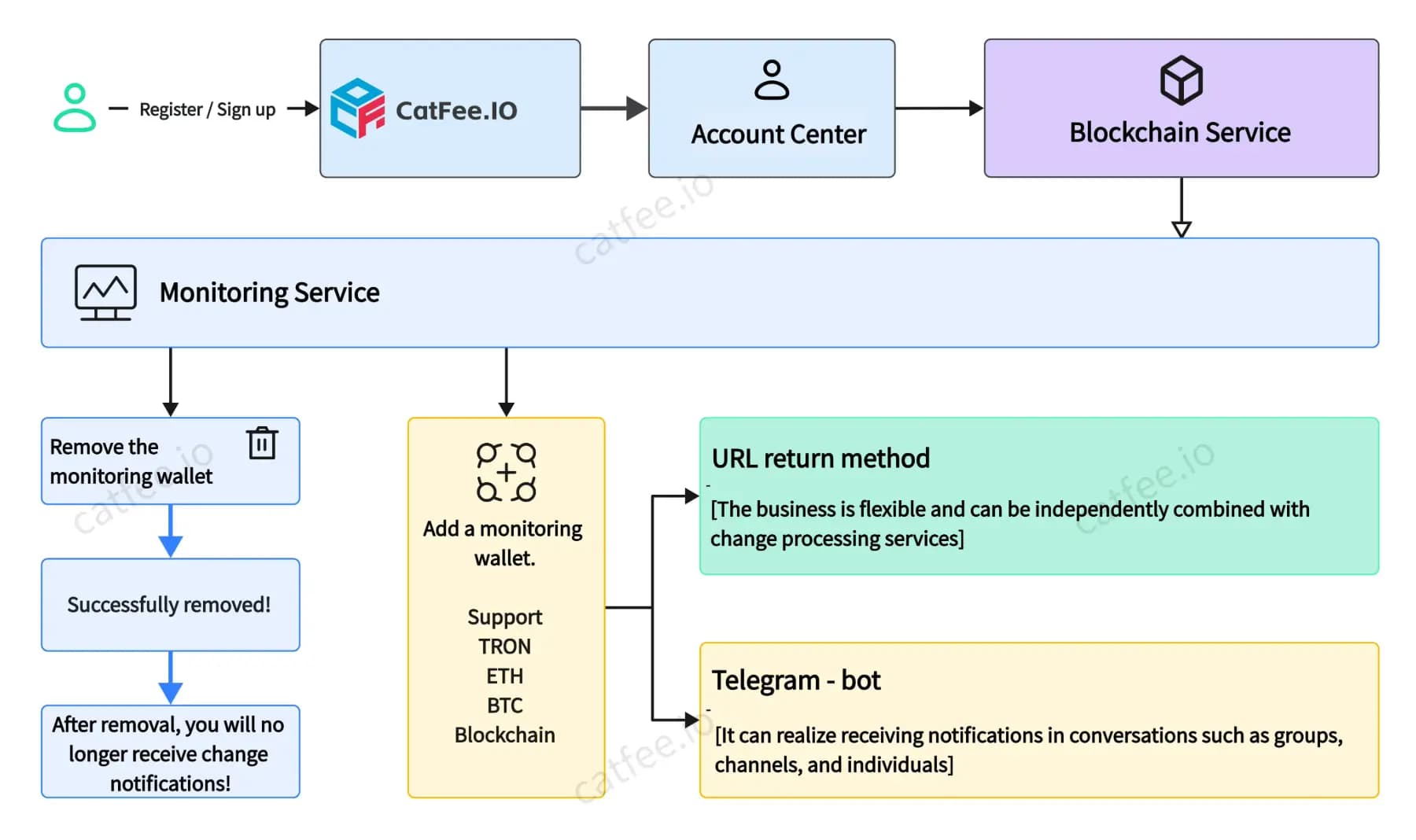
CatFee blockchain monitoring service helps users track real-time blockchain data changes, such as transactions, balances, and blocks. Based on the CatFee blockchain network, it provides various interfaces and tools for users to query and analyze blockchain data.
Powerful Monitoring Capabilities
All-in-one Blockchain Monitoring Solution
Real-time Transaction Monitoring
CatFee Blockchain Monitoring Service helps users track real-time blockchain data changes, such as transactions, balances, and blocks.

URL Callback
Send us your callback URL, and we will notify you when blockchain data changes
Telegram Bot Notification
Bind your Telegram bot with our service, and we will send you notifications when blockchain data changes
Two Notification Methods for Different Needs
Flexible Pricing Plans
From free trial to professional service, meeting different scale needs
FREE
Quick Start Experience
Exclusive for CatFee Users
PRO
Preferred by Professional Teams
Only $0.33 per day
Already 2,000+ users chosen
Quick Integration
Get started in a few simple steps
Configuration Steps
- 1Login to CatFee Dashboard
- 2Go to "Blockchain Monitoring" → "Wallet Management"
- 3Add wallet addresses to monitor
- 4Choose notification method (URL callback or Telegram bot)
- 5Save configuration and start receiving notifications
URL Notification
Suitable for system integration, supports custom processing logic
URL Notification
Suitable for system integration, supports custom processing logic
URL Notification
When blockchain transactions (such as USDT, ETH, etc.) amount changes are detected, we will push notification information to you through your provided callback URL.
The notification includes important information such as: transaction hash, block number, monitored address, payment address, contract address, receiving address, transaction amount, currency, and blockchain.
The receiver only needs to return the string 'success' to confirm receipt of the notification. It is recommended to process business logic asynchronously and use chain+txn_hash as the primary key to prevent duplicates.
Request Parameters (JSON)
Response Handling
Return success to confirm receipt
If 'success' is not received, notifications will be sent 10 times at the following frequency
0s → 15s → 30s → 3min → 10min → 20min → 30min → 60min → 3h → 6h
Node.js Reception Example
Telegram Bot Notification
Suitable for personal use, instant message push
Telegram Bot Notification
Suitable for personal use, instant message push
Telegram Bot Notification
When blockchain transactions (such as USDT, ETH, etc.) are detected, we will send you notification messages through your Telegram bot.
Usage Steps
Apply for Bot
- Open Telegram, search and add@BotFather
- Enter command /newbot to start creating a new bot
- Follow the prompts to set the bot's name and username
- Record the generated bot token, which is crucial for subsequent binding
Bind Bot to Catfee
- Login to Catfee.io personal center, selectBot Settingspage to input the bot token
- Click "Bind" button to complete bot binding
- After binding, energy selling bot is activated for free!
Configure Bot Notifications
- Add the bot to the chat where you want to receive wallet monitoring change messages
- In Catfee.io personal center, select "Add Monitor Wallet"
- Enter the chat ID to ensure the bot can receive notifications correctly
Set Monitoring Parameters
- On the monitor wallet page, select the blockchain type to listen to
- Enter the wallet address to monitor
- Select [Telegram bot] type, set the blockchain type to monitor (BTC | ETH | TRON)
- Set chat ID, can choose channel, group or personal chat
💡 How to get chat ID:
- Visit Telegram bot:@CatFeeProBot
- Send the command
/toolsto the bot - Select the chat ID query tool from the popup tool list
The bot will return the current chat ID, for example:
- User ID format:userID:8090000000 (where 8090000000 is the user chat ID)
- Group ID format:groupID:-4980000000 (where -4980000000 is the group chat ID)
Ready to Get Started?
Experience TRON blockchain real-time monitoring service now
Service Navigation
Discover Our Complete Service Ecosystem


Buy Energy
Secure, affordable and fast TRON energy service
TRON Mate
24/7 automatic energy monitoring and refill service for uninterrupted blockchain operations
Telegram Energy Bot
Quote, order, pay, and receive TRON energy directly inside Telegram
Flash Energy
Instant energy recovery for lightning-fast transactions
Staking
No authorization required, delegate and withdraw anytime, earn trx, release value!
Buy TRON TRX
One-click TRX purchase, best exchange rates, verifiable on-chain, safe and reliable!
TRON Energy Subleasing
Earn TRX quickly through energy subleasing service.
TRON Node Service
Enterprise-grade TRON node service with high availability.
Telegram Premium
Buy Telegram Premium with TRC20-USDT, API supported.
Custom Telegram Bot Service
Build your own energy bot or any custom Telegram bot without writing code.
Whale Vault
Exclusive high-yield staking service tailored for whale users.
API Integration
Developer-friendly REST API service with multi-language support!